Auto Translate | FixIt
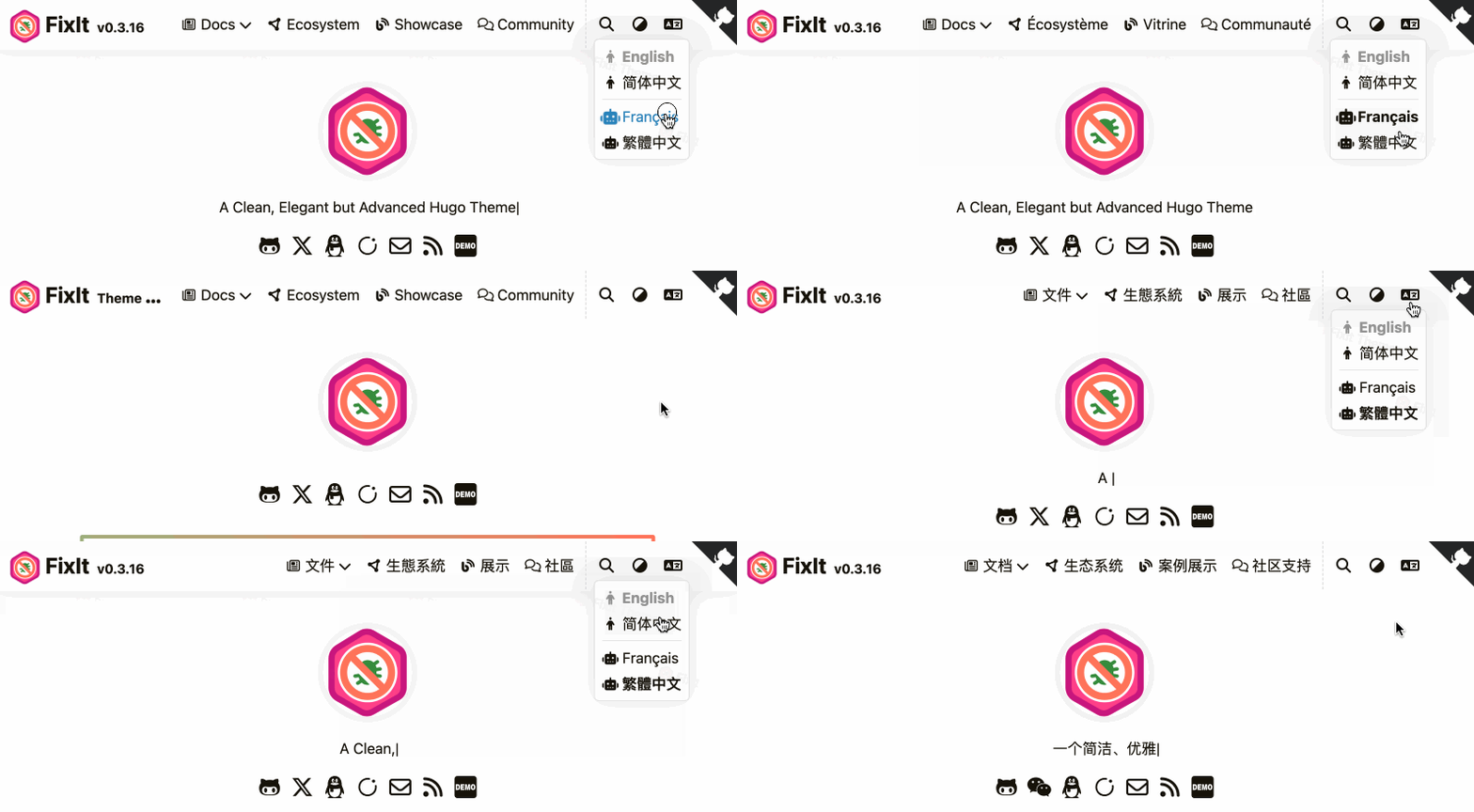
Demo
Whether the original site is multilingual or single-language, you can add automatic translation feature through this component.
Switch the configured translation language in the upper right corner of the website, or add the ?lang= parameter to the URL to specify any supported translation language. e.g. ?lang=korean.
Features
Daily translation characters 2 million!
No language configuration file, no API Key, SEO friendly!
- Support automatic translation of the entire page
- Support specifying the translation language
- Support optional translation services
- Support ignoring translation elements
- Support ignoring selectors
- Support ignoring keyword translation
- Support detecting local languages
- Support custom translation terms
- Support CDN
- Support Enterprise Translation Channel *
Requirements
- Hugo v0.161.0 or later.
- FixIt v1.0.0 or later.
Please use v1 version of this component if FixIt is v0.4.5.
Install Component
The installation method is the same as installing a theme. There are several ways to install, choose one, Here are two mainstream ways.
Install as Hugo Module
First make sure that your project itself is a Hugo module.
Then add this theme component to your hugo.toml configuration file:
1
2
3
4
5
6
7
| [module]
[[module.imports]]
path = "github.com/hugo-fixit/FixIt"
[[module.imports]]
path = "github.com/hugo-fixit/cmpt-translate/v2"
|
On the first start of Hugo it will download the required files.
To update to the latest version of the module run:
1
2
| hugo mod get -u
hugo mod tidy
|
Install as Git Submodule
Clone FixIt and this git repository into your theme folder and add it as submodules of your website directory.
1
2
| git submodule add https://github.com/hugo-fixit/FixIt.git themes/FixIt
git submodule add https://github.com/hugo-fixit/cmpt-translate.git themes/cmpt-translate
|
Next edit hugo.toml of your project and add this theme component to your themes:
1
2
3
4
| theme = [
"FixIt",
"cmpt-translate"
]
|
Configuration
In order to Inject the partial cmpt-translate.html into the custom-assets through the custom block opened by the FixIt theme, you need to fill in the following necessary configurations:
1
2
3
4
5
6
7
8
| [params]
[params.custom_partials]
# ... other partials
menuDesktop = [ "inject/translate-menu-desktop.html" ]
menuMobile = [ "inject/translate-menu-mobile.html" ]
assets = [ "inject/cmpt-translate.html" ]
# ... other partials
|
In addition, you can customize the translated language through the following configuration:
 1
 2
 3
 4
 5
 6
 7
 8
 9
10
11
12
13
14
15
16
17
18
| [languages]
[languages.en]
locale = "en"
label = "English"
[params]
[params.auto_translate]
enable = true
service = 'client.edge'
languages = []
ignore_id = []
ignore_class = []
ignore_tag = []
detect_local_language = false
cdn = ""
enterprise = false
|
enable: Whether to enable automatic translation.service: The translation service provider, optional values are client.edge and translate.service, see: Translation Service Provider.languages: List of language ID to translate to, e.g. ["english", "chinese_simplified", "chinese_traditional", ...], see the full language list: Full Language List.ignore_id: Element IDs that needs to be ignored for translation, e.g. ["comment", ...]ignore_class: Class names that need to be ignored for translation, e.g. ["post-category", ...]ignore_tag: Tag names that need to be ignored for translation, e.g. ["title", ...]ignore_text: Texts that needs to be ignored for translation, e.g. ["FixIt", "Lruihao", ...]detect_local_language: Whether to detect the local languagecdn: CDN of translate.js, e.g. https://cdn.jsdelivr.net/npm/i18n-jsautotranslate@latestenterprise: Whether to use the enterprise translation channel
Note
To avoid translation language acquisition failure, even if your site itself is single-language, you need to configure locale and label, for example:
1
2
3
4
5
| [languages]
[languages.zh-cn]
locale = "en"
label = "English"
|
Front Matter
1
2
3
4
| auto_translate:
local: ''
from_languages: []
only_local_lang: false
|
local: String Used to specify the local language of the current page, e.g. local: english.
The default local language is the same as the Hugo site configuration. If the actual language of a page is different from the site configuration, you can specify it through the local parameter.
from_languages: Array type, used to specify whether the languages in the current page content need to be translated.
For example: the webpage itself is in Chinese, but there are other languages in the content. You can specify the language to be translated, for example:
1
2
3
| from_languages:
- chinese_simplified
- chinese_traditional
|
only_local_lang: Boolean type, used to specify whether to translate only the local language of the current page, the default is false.
For example: the webpage itself is in Chinese, but there are summary references in other languages in the content. Set only_local_lang: true to translate only Chinese.
Custom Translation Terms
Create a nomenclature.yml file in the data folder of your project directory, and then add custom translation terms, for example:
 1
 2
 3
 4
 5
 6
 7
 8
 9
10
| - from: english
to: chinese_simplified
properties:
Hello: 你好
World: 世界
- from: english
to: french
properties:
Hello: Bonjour
World: Monde
|
Enterprise Translation Channel
Enterprise-level stable translation channel, open only to paying users.
Experience quota: There is a daily experience quota of 50,000 characters, and the excess will no longer be translated!
Set enterprise = true in the configuration to enable the enterprise translation channel. The enterprise translation channel has the following advantages over the ordinary translation channel:
| Service | Open source translation channel | Enterprise translation channel |
|---|
| Server cache layers | 1 layer (file cache) | 1 layer (memory + file cache) |
| Translation response speed | 1.5~5 seconds | 0.8~1.5 seconds |
| Translation server | 1 | >=3 |
| Network nodes | 2 | >=4 |
| Translation channel | Manual setting | Automatically match the best |
| Domestic cache nodes | None | Yes |
| Daily translation characters | 2 million | 50 million |
Considering that most of the FixIt ecosystem audiences are individual users, I (@Lruihao) will use sponsorship income as a subsidy in my personal name.
Tip
Subsidy price for FixIt project: ¥10 ¥50 / domain / month
Automatically disabled upon expiration, requiring re-sponsorship renewal!
Those who meet the following requirements can contact me for free to open an enterprise translation channel:
- translate.js and related ecological product developers
- FixIt and related ecological product developers
Choose the donation amount, and then remark AutoTranslate: your domain name in the message.
Contact the author through the following methods:
Acknowledgements
translate.js provides technical support and sponsors Enterprise Translation Channel.
 FixItTheme for Hugo